

Introduction
Pinterest secret boards are private folders that only you can see. Unlike regular boards, they do not appear on your profile or in search results. This makes them the perfect place to save ideas, organize plans, or store inspiration without sharing it with the world. You can easily invite specific people to collaborate on them if you want to keep a project between a small team.
Imagine having a hidden workspace where you can dump every wild idea and messy draft before it goes live. Business planning can be chaotic, and you do not always want your competitors or followers to see your strategy before it is ready. Using these hidden tools allows you to experiment with your brand’s look and feel in total privacy. It gives you the freedom to fail, refine, and perfect your vision until it is ready for a big reveal.
Smart business planning on Pinterest is all about using these secret spaces to stay organized and ahead of the curve. You can use them to research your competitors, curate seasonal content months in advance, or build a private mood board for a new product launch. By keeping your strategic pins tucked away, you ensure your public profile remains polished and professional. This approach helps you turn a simple social media app into a powerful engine for your brand’s growth.
Pinterest Secret Boards Guide
Pinterest secret boards are private folders that only you can see. They do not show up on your public profile or in search results. This makes them a perfect spot to save ideas you are not ready to share yet. You can keep your plans hidden while you work on them. If you want help, you can still invite a few specific people to see the board with you.
These boards are excellent for planning big projects or new business ideas. You can pin images, links, and notes without worrying about what your followers see. It keeps your public page looking clean and professional at all times. Using these secret spaces allows you to organize your thoughts in private. Once your plan is perfect, you can easily change the setting to make the board public for everyone to enjoy.
Are Pinterest Secret Boards Private?
Yes, Pinterest secret boards are completely private and hidden from the public. Only you can see the pins you save to these special boards. They do not appear in your profile, and they will not show up in anyone’s home feed or search results. This makes them a safe space to store personal ideas or business plans that you are not ready to share with the world yet.
Even though these boards are private, you still have control over who sees them. You can keep a board entirely to yourself, or you can invite specific people to collaborate with you. Only the people you personally invite will be able to view the content or add their own pins. It is a great way to work on a team project or a gift idea while keeping the rest of your followers in the dark.
Create Pinterest Secret Boards Fast

Creating a secret board on Pinterest is a very quick and simple process. You can start by going to your profile and clicking the plus icon to create a new board. When the setup window appears, you will see a toggle switch that asks if you want to keep the board secret. Make sure to slide this toggle to the “on” position so that your new space stays hidden from the public eye.
Once the board is active, you can immediately begin saving your private ideas and plans. This feature allows you to gather inspiration for upcoming projects without cluttering your main profile. It is a great way to stay organized while keeping your business strategies or personal gifts a complete surprise. You can always change these settings later if you decide to share your work with everyone.
- Open your Pinterest profile and tap the plus sign.
- Choose the option to create a new board.
- Give your board a clear name that helps you stay organized.
- Click the toggle button to make the board secret.
- Save your first pin to finish the process.
Pinterest Secret Boards for Planning
Pinterest secret boards are a great tool for organizing your future projects in private. You can save all your ideas, research, and inspiration in one hidden spot. This keeps your public profile looking clean and professional at all times. It is a perfect way to build a vision board for a new brand or a personal project without anyone else seeing your rough drafts.
Using these hidden spaces helps you stay focused and organized during the planning phase. You can group your ideas into different boards to see how they look together. If you are working with a small team, you can invite them to view the board while keeping it secret from the rest of the world. This allows you to refine your strategy until everything is perfect and ready for a big reveal.
Uses of Pinterest Secret Boards
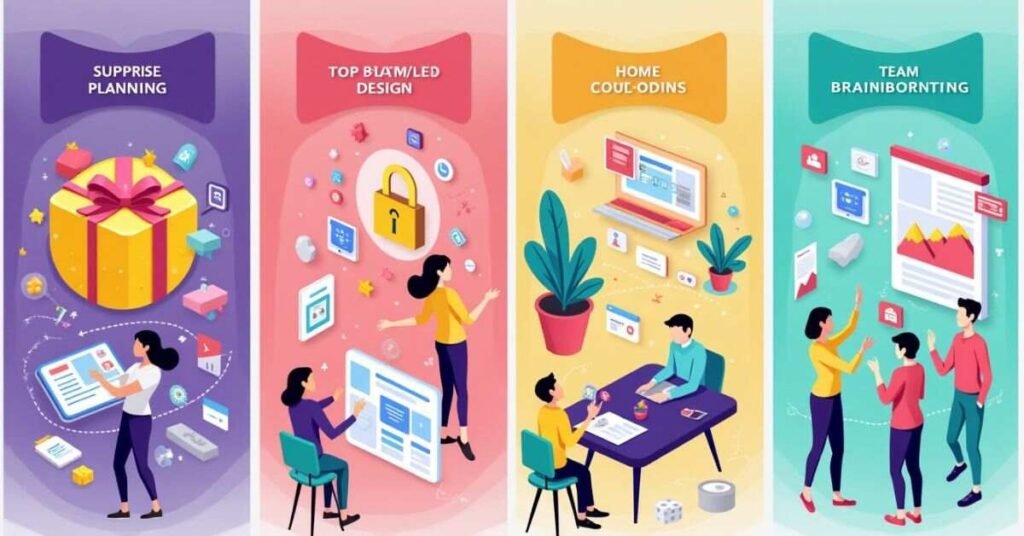
Pinterest secret boards are incredibly useful for keeping your ideas organized and private. Many people use them to plan big life events or surprise parties without giving away the secret. They are also perfect for storing personal inspiration that you might not want on your public profile. By using these hidden spaces, you can save as many pins as you want without worrying about what your followers think.
These boards are also a powerful tool for business and creative projects. You can use them to research your competitors or build a mood board for a new brand identity. It is a safe place to experiment with different styles and colors before you launch them to the public. If you are working with a small team, you can invite them to collaborate in this private workspace to keep your strategy under wraps.
- Plan a Surprise: Keep gift ideas and party details hidden from friends and family.
- Research Competitors: Save marketing strategies and product ideas in private.
- Creative Drafts: Build mood boards for new projects before they are finished.
- Personal Interests: Save topics or hobbies that you prefer to keep to yourself.
- Team Collaboration: Share a secret board with specific partners for private brainstorming.
Pinterest Secret Boards for Business
Pinterest secret boards are a powerful tool for growing your brand in private. You can use these hidden spaces to plan your future content and strategy without your followers seeing the messy work. It is a great place to save ideas for new products or research what your competitors are doing. This allows you to keep your public profile looking polished and professional at all times.
These boards also help you stay organized when working with a small team. You can invite specific partners or employees to a secret board to brainstorm together. It is a safe workspace to experiment with different looks and marketing hooks before they go live. Once your plan is perfect, you can easily turn the board public to share your new vision with the world.
Secret vs Public Boards on Pinterest

Pinterest offers two main types of boards to help you organize your ideas. Public boards are visible to everyone and show up on your profile and in search results. They are great for sharing your style, building a following, and showing off your brand. When you pin to a public board, your followers can see those pins in their home feeds.
Secret boards are private spaces that only you and the people you invite can see. They do not appear on your profile or in any public searches. This makes them perfect for planning surprises, storing personal ideas, or working on business strategies in private. You have full control over who sees this content, which keeps your unfinished projects hidden from the world.
| Feature | Public Boards | Secret Boards |
| Visibility | Visible to everyone on Pinterest | Only visible to you and invited guests |
| Search Results | Appear in Pinterest and Google searches | Never appear in any search results |
| Profile Display | Shown on your main profile page | Hidden from your public profile page |
| Followers | Followers see pins in their home feed | Followers cannot see any activity |
| Collaboration | Anyone can follow; you can invite others | Only invited people can see or pin |
| Best Use | Branding, sharing, and growing a following | Private planning and secret projects |
| Privacy Toggle | Can be changed to secret later | Can be changed to public later |
Pinterest Secret Boards Tips
Using secret boards on Pinterest is a smart way to stay organized without the pressure of being perfect. You should treat these boards as your private workshop for new ideas. It is a good tip to give your secret boards clear names so you can find your pins quickly. You can also move pins from a secret board to a public one whenever you are ready to share your hard work with the world.
Another great tip is to use the collaboration feature to work with a small team in private. You can invite a friend or a business partner to your secret board to brainstorm together. This keeps your conversation and your strategy hidden from your competitors. It is also helpful to use these boards for seasonal planning months in advance. This way, your public profile always stays current and professional for your followers.
- Stay Organized: Use specific names for each secret project you are planning.
- Invite Partners: Share your secret board with a few people for private feedback.
- Move Pins Later: Easily drag pins to public boards when your plan is finished.
- Hide Drafts: Use secret boards to test out new aesthetic looks for your brand.
- Plan Ahead: Save holiday or seasonal ideas long before you need to post them.
Why Use Boards
Pinterest secret boards are a great way to save ideas without anyone else seeing them. They give you a private space to explore new styles or hobbies in peace. You do not have to worry about your followers seeing your unfinished thoughts or messy plans. This privacy helps you feel more creative and less judged while you gather inspiration.
These boards are also very helpful for keeping your business or personal life organized. You can plan a surprise gift or a new brand launch without giving away the secret. It allows you to build a complete vision before you decide to show it to the world. Using these hidden spaces ensures your public profile always looks professional and well-planned.
Pinterest Secret Boards Mistakes

One common mistake is forgetting that pins saved to secret boards can still be seen if you share the direct link. You should always be careful about who you invite to collaborate on your private spaces. Another error is keeping a board secret for too long when it could be helping your profile grow. If your plan is finished and ready for the world, making it public can bring in new followers and traffic.
Many people also forget to organize their secret boards with clear names and descriptions. This can make it very hard to find your best ideas when you are ready to use them. It is also a mistake to think that secret boards are only for personal use. Businesses often miss out on the chance to use these hidden areas for team brainstorming or competitor research. Keeping your workspace tidy and purposeful will help you get the most out of this feature.
- Sharing Links: Be mindful of who has access to your private board links.
- Staying Secret: Don’t forget to flip the switch to public when your project is ready.
- Messy Organization: Use clear titles so you don’t lose track of your best pins.
- Ignoring Teams: Remember that you can invite partners to a secret board for private work.
- Overthinking: Don’t be afraid to pin “messy” ideas since no one else can see them.
Conclusion
Pinterest secret boards are a simple but powerful tool for your personal and business life. They give you a private space to explore new ideas without any pressure from the public. You can use these hidden boards to stay organized, plan surprises, or build your brand strategy in total peace. It is a great way to keep your profile looking professional while you work on your next big project behind the scenes.
Using these boards correctly helps you turn your messy drafts into a polished success. Whether you are planning a small party or a major business launch, the privacy of a secret board is a huge advantage. You have full control over who sees your work and when it is ready to be shared. Start using secret boards today to give yourself the freedom to create, experiment, and grow in private.
FAQs
1. Can my followers see what I pin to a secret board?
No, your followers cannot see your secret boards or the pins you save to them. These boards are completely hidden from your public profile and home feeds.
2. How many people can I invite to a secret board?
You can invite as many people as you like to collaborate on a secret board. Only the people you personally invite will be able to see the content.
3. Will my secret pins show up in Google search results?
No, secret boards and their pins are blocked from all search engines and Pinterest search. Your private ideas stay strictly private.
4. Can I change a secret board to a public board later?
Yes, you can easily switch a secret board to public by changing the toggle in the board settings. However, once it is public, you cannot make it secret again.
5. Is there a limit to how many secret boards I can have?
Pinterest allows you to create as many secret boards as you need. There is no specific limit, so you can organize all your private projects freely.

Welcome to Digital Pin Media! I’m Usama Ijaz, an AI-Powered SEO, and Content Write with 4 years of experience.
I help websites rank higher, grow traffic, and look amazing. My goal is to make SEO and web design simple and effective for everyone.
Let’s achieve more together!




One Comment